Add AncestralFire to the AI you already use.
You add it once, sign in with your AncestralFire account, and ask about your family in the assistant you already know. It is the same family and the same answers as on our site.
AncestralFire currently doesn't support sign-up from the European Union, Iceland, Liechtenstein or Norway. We'll open there once our EU representative is in place.
https://mcp.ancestral-fire.com/mcp
No account yet? Make one first, then add AncestralFire to your assistant and sign in with it.
Claude
- In Claude, open Customize, then Plugins, find AncestralFire and add it. Its connector comes with it. Press Connect and sign in with your AncestralFire account.
- Or add only the connector: Customize → Connectors, + Add, Add custom connector. Name it AncestralFire, paste the address above, press Continue, keep the sign-in settings Claude suggests, then press Continue, Add and Connect.
- Ask: "Who's in my family?"
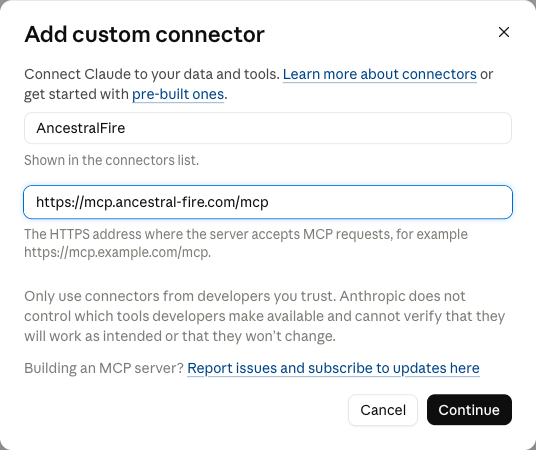
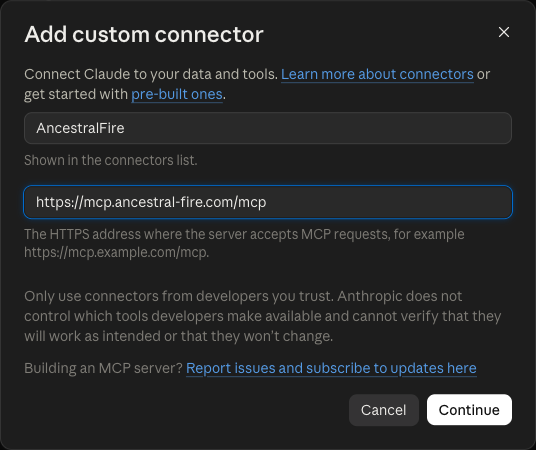
Every step, and the setting that saves a question each time: Claude on its own page.
Claude Code
- In a terminal, add it once for every folder:
claude mcp add --transport http --scope user ancestralfire https://mcp.ancestral-fire.com/mcp - Start Claude Code and type
/mcp, choose ancestralfire, and sign in with your AncestralFire account. - Ask: "What's in my family tree?"

ChatGPT
Until AncestralFire is listed in ChatGPT's own directory, you add it as a custom MCP server. Which plans and workspaces can do that is OpenAI's to say, and your workspace's policies apply; if you don't see the option, ask your workspace's admin.
- Go to chatgpt.com/plugins, select the + button, then Add custom MCP server.
- Enter a name (AncestralFire) and a short description. Under Connection, choose a public endpoint and enter the address above as the MCP server URL.
- Set the authentication to sign in with your AncestralFire account, review the warning, and select I understand and want to continue.
- Select Create as a plugin, then sign in with your AncestralFire account when ChatGPT asks.
- In a new conversation, type @ and select AncestralFire, then ask: "Who's in my family?"
Grok
- In Grok, open Plugins (bottom left), or go to grok.com/connectors, and press New Connector.
- Choose Custom: Add your own custom connector.
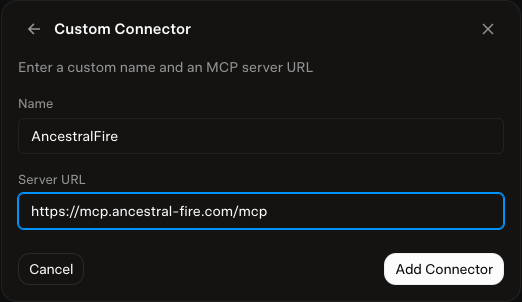
- Name it AncestralFire, type the address above as the server URL, and press Add Connector. Type it in; the button stays gray until both fields hold typed text.
- Sign in with your AncestralFire account in the window that opens, then press Allow access.
- In a chat, press +, then Connectors, and check that AncestralFire is on. Ask: "Who's in my family?"
Any other assistant
Any assistant that connects to remote MCP servers takes the same address: https://mcp.ancestral-fire.com/mcp. It is a hosted server over HTTPS and signs in with your AncestralFire account, so nothing runs on your computer. Developers and reviewers: the server's sign-in, every tool and its limits are in the docs.
We have added it ourselves in the apps above. These are from each app's own instructions, which we have not walked, so follow the app's page if it differs:
- Codex. Add a Streamable HTTP server in its config.toml or the app's Add server, then sign in with
codex mcp loginand the name you gave it. Codex's instructions. - Gemini CLI. Add the address as
httpUrlin anmcpServersentry in its settings. It opens your browser to sign in, so it needs a browser on the same computer. Gemini CLI's instructions. - Cursor. Add the address as
urlinmcp.json, or on its Customize page. It signs in through your browser. Cursor's instructions. - Microsoft Copilot Studio. Add a Model Context Protocol tool to an agent and enter the address. It takes the Streamable HTTP kind of server, with OAuth sign-in. Microsoft Copilot Studio's instructions.
- VS Code with Copilot. Add the address as
urlin.vscode/mcp.json, or run MCP: Add Server. VS Code with Copilot's instructions.
AncestralFire works with FamilySearch Family Tree, the free shared tree. When you connect it, you sign in on the FamilySearch website, and we never see your password. Disconnecting in Settings deletes the token we hold.
Before anything is added to FamilySearch Family Tree, the shared tree, you see exactly what will be written and press Approve, with your reason. The assistant can't approve it for you. In Claude on the web and in Claude Desktop, you press Approve in the conversation. Where an assistant can't show the Approve button, it gives you a link that opens the same change on ancestral-fire.com, where you approve it signed in to your account.
Stuck? Write to us. Your family's data stays yours: see Privacy.